

Jira components are project-scoped. If multiple projects share functional areas – "Authentication", "Payments API", "CI/CD Pipeline" – Subcomponents for Jira Cloud gives Jira admins a way to define a component once and manage it across linked projects while each project keeps its native Jira component. This guide explains why the project boundary causes trouble and how cross-space components and the GLOBAL JQL keyword address it.
This is not a new observation. Jira users have been asking for shared components since 2005. The feature request "Ability to share components between projects" accumulated roughly 1,200 votes across Server and Cloud versions. In May 2023, Atlassian marked both as "Not Being Considered."
The request did not go away because the problem did not go away. Organizations that grow past a handful of Jira projects still face the same cycle: recreate the same component in every new project, maintain each copy independently, and accept the naming drift that eventually breaks cross-project reporting.
What breaks when components cannot cross project boundaries
At small scale, project-scoped components are a minor inconvenience. At enterprise scale, the consequences compound.
Naming drift. Without a central definition, teams create components with slightly different names – "Backend" in one project, "Back-End" in another, "Backend Services" in a third. Nobody intends the inconsistency, but as one enterprise customer put it: "people create similar components with different names not knowing that a component for this element already exists." Over time, the flat component list in each project becomes a local dialect that only the project lead understands.
Manual maintenance. Every change – renaming a component, updating a lead, archiving an outdated area – must be repeated across every project that uses it. Admins have tried scripting the synchronization, but renaming a component through a sync script can create a duplicate instead of updating the existing one. Others discovered that Jira has no component events to subscribe to, making real-time sync through automation impossible.
Broken cross-project reporting. Dashboard widgets that filter by component name show the same component N times – once per project – instead of aggregating. The result is a cluttered chart that lists the component N times instead of summing issues into a single view. For delivery managers who need a unified view of work across teams, the dashboard becomes harder to read than the spreadsheet it was supposed to replace.
JQL workarounds that do not scale. When querying components across projects, users must enumerate every project key in JQL. For a platform team managing one component across 15 projects, that is 15 separate clauses unioned together – the kind of query that makes people stop building dashboards and start maintaining spreadsheets.
If your Jira instance has outgrown the project-scoped component model, the next step is a layer that removes the boundary. Subcomponents for Jira Cloud 4.2.0 adds that layer.
Define a component once, manage it everywhere
Cross-space (cross-project) components in Subcomponents for Jira give a Jira admin a single place to create a component and assign it to any number of projects – the app handles synchronization from that point on. A rename, a new lead assignment, or an updated description only needs to happen once – every linked project picks up the change automatically.
Nothing changes at the project level – each one still holds a native Jira component, so workflows, boards, and filters behave exactly as they did before. The app simply connects those components under a shared definition that keeps them aligned.
Create a cross-space component
- Open Apps in the Jira left sidebar, select Subcomponents, and navigate to the Cross-space components tab.
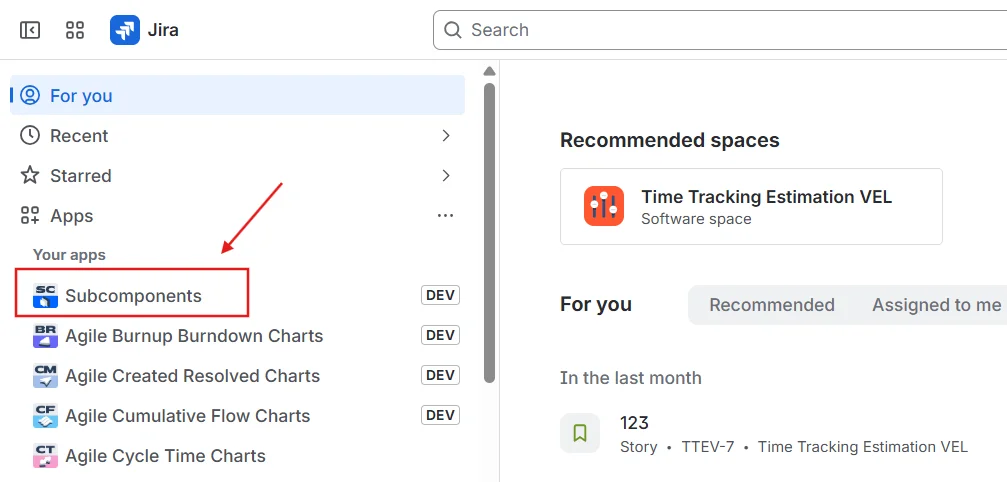
You can also get there from any space: on the space's Subcomponents tab, click Manage cross-space components in the toolbar.

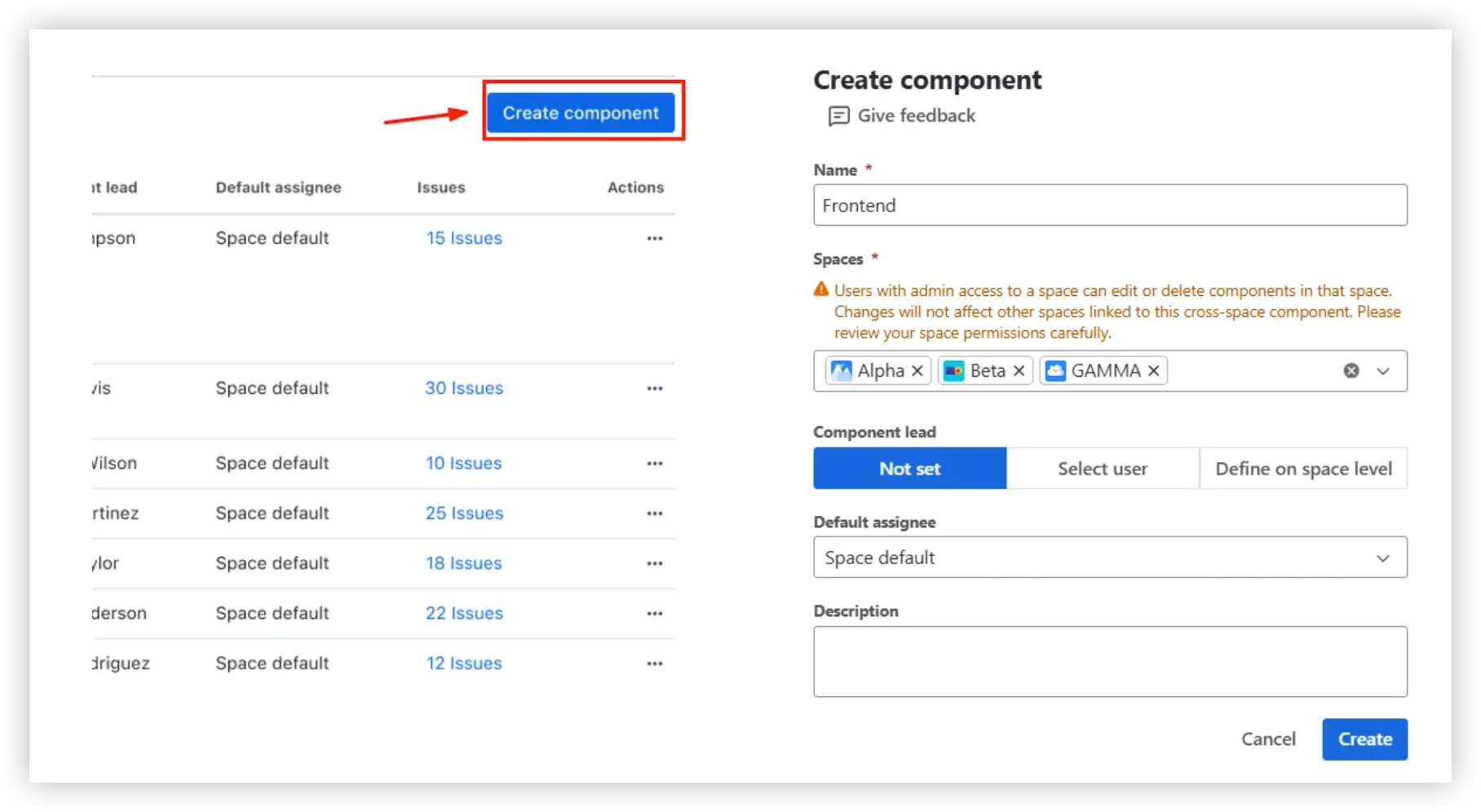
- Click Create component, set the name and properties, and select the projects it should belong to. The app creates a native Jira component in each selected project and keeps them linked.
Merge existing duplicates
For organizations that already have the same component scattered across multiple projects, the app spots components with matching names and offers to consolidate them under one cross-space definition. Issues stay assigned to their current components throughout – no re-linking required. The admin picks which name, lead, and description carries forward.

Detect divergence instead of overriding it
If a project admin modifies a component directly in Jira's built-in Components settings, the cross-space view surfaces the mismatch. From there, the admin can pull the local copy back in line or separate that project from the shared definition entirely. The point is not to enforce uniformity – it is to make differences visible so they can be resolved deliberately rather than discovered six months later in a broken dashboard.
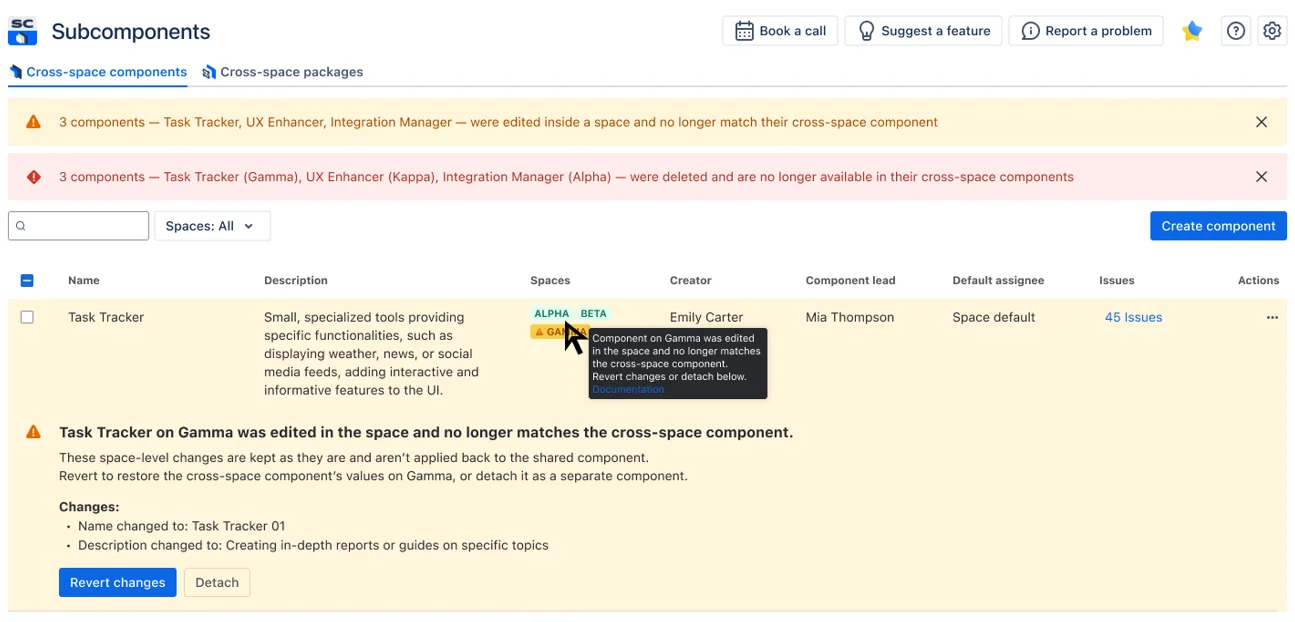
Cross-space components ship as part of the Advanced edition of Subcomponents for Jira Cloud.
Query across all projects with one JQL clause
Sharing a component definition is half the story. The other half is reporting: can you pull every issue tagged with that component into a single filter or dashboard, no matter which project it lives in?
The GLOBAL keyword for the subcomponents() JQL function turns that into a one-liner:
component IN subcomponents("GLOBAL", "Authentication")
The result set spans every project where that component exists – including child components – without the need to specify project keys. Paste the query into a saved filter, a dashboard gadget, or any Jira report for a unified cross-project view. The keyword works regardless of capitalization, and any single-project queries you already have remain unaffected.
For a platform team, this collapses N separate JQL clauses into one. For a delivery manager, it means a single dashboard gadget can show all "Authentication" issues across every team – without the gadget author needing to know which projects exist.
Setting it up
- Create a cross-space component or merge existing same-name components into one shared definition.
- Build a cross-project filter or dashboard gadget using the
GLOBALkeyword:component IN subcomponents("GLOBAL", "Your component name") - Add the saved filter to a dashboard to get a unified view of all issues under that component, across every project.
Should you evaluate it?
If your Jira instance has a few projects with no overlapping component names, native Jira components may be enough.
If your teams share functional areas across projects and you are maintaining the same component list in each one manually, cross-space components remove that repetition. The long-standing request for a shared component layer is now available through Subcomponents for Jira Cloud on the Atlassian Marketplace.




.png)